Build a TempReas model with the help of artificial intelligence.
Describe a system in a few sentences and get a first model structure: that is what an artificial intelligence can do when it knows TempReas's construction rules.
The principle comes down to four steps:
- Describe. You describe in plain language the system you want to study, or the data you want to model.
- Provide the rules. You give the AI the TempReas prompt, which explains how to express a model: stocks, flows, actions and temporality.
- Get the list. The AI replies with a structured list of the model's elements, along with its assumptions.
- Build and check. You load this list into TempReas to obtain the model, then you check it, correct it and complete it.
The AI offers a starting point. It may make mistakes or assumptions you would not have made: you are the one who validates the model.
This feature is under development: the list proposed by the AI can already be imported directly into TempReas, as the result at the bottom of the page shows, but the prompt and the syntax may still change.
Give the AI TempReas's construction rules
This text explains to the AI how to express a TempReas model. Copy it into your AI assistant, or download it, then add your description. It is updated regularly: the version shown here is always the latest one.
The prompt could not be loaded in this page. You can open it directly: promptEn.txt.
A complete example from public data
To illustrate the principle on a real case, I asked the AI to build a model of the State budget. After giving it the TempReas prompt, I submitted the following statement.
The statement
I would like a list of elements to create, in TempReas, a model of the State budget.
First, look on an official website (INSEE, data.gouv.fr or other) for the most suitable Excel file: it must contain all the State's expenditure and revenue, line by line, for a given year.
Then build the model from this file:
- one line of the table corresponds to one flow;
- each flow goes from a source stock to a target stock: the table does not always specify the counterparties, so suggest those that seem consistent to you and flag them as assumptions to be validated;
- annual amounts are spread over the months of the year;
- the amounts must appear clearly in the code, so that I can change them to test other scenarios.
State your source, your assumptions and the elements you did not model. Add control elements (total expenditure and revenue, balance) so that I can compare the results with the original file.
The AI's response
Here is the list proposed by the AI, shown as generated (in French).
Lines starting with // are comments: the AI uses them to
state its source, its modelling choices, the assumptions to validate
and what it did not model. Scroll the frame to read it in full.
Warning: this response was obtained at a given moment and may no longer be up to date. Since the feature is under development, the prompt may have changed since: a response obtained today may therefore be different. It is shown for illustration purposes.
This proposal is a starting point. The AI states in a comment the results expected at the end of the cycle (total expenditure, total revenue and balance): they make it possible to check the model once it is built in TempReas, then to correct or complete it.
From the AI's proposal to the TempReas model
Here is the result obtained in TempReas from the list provided by the AI: it was copied as is, then the model was built with a single mouse click.
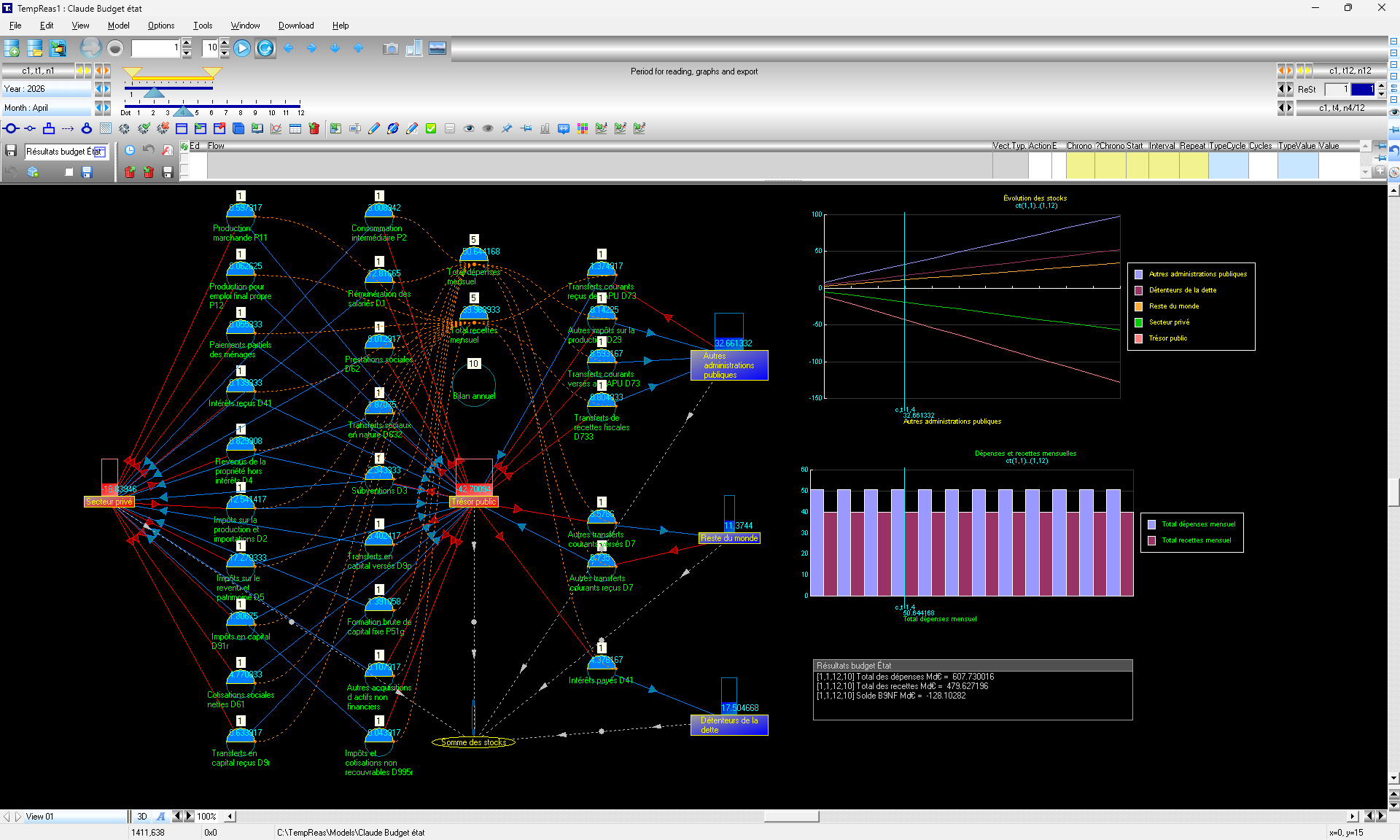
“State budget” model in TempReas. Drag the image or use the scroll bars to explore it.